


Key Takeaway: Children enrichment center software is a specialized platform that automates daily administrative tasks like scheduling, billing, and parent communication. This system replaces messy spreadsheets and disjointed messaging apps, cutting admin work by over 60% and allowing you to manage diverse programs from one dashboard.
What is Children Enrichment Center Software?
Children enrichment center software is a digital command center for your entire business. This tool is built specifically to handle the unique demands of running diverse educational programs, from art and music classes to sports camps and academic tutoring.
Instead of wrestling with a dozen different tools that do not talk to each other, you get one unified system. Everything works together seamlessly. When a parent books a class online, the master schedule updates instantly, the teacher receives a notification, and the invoice is automatically queued up.

Why do spreadsheets and manual methods fall short?
As your center grows, leaning on manual tools like spreadsheets and WhatsApp creates serious operational drag. Spreadsheets are notorious for human error, leading to painful mistakes like double-booked rooms or incorrect invoices. Managing parent communication through messaging apps is disorganized, unprofessional, and makes tracking important information nearly impossible.
Manual Methods vs. Automated Software
The difference between running your center with spreadsheets and using purpose-built software is significant. Automation brings a level of efficiency and accuracy that manual methods cannot match. It's the gap between working in your business and working on your business.
| Administrative Task | Manual Method (Spreadsheets, Email, WhatsApp) | Children Enrichment Center Software |
|---|---|---|
| Class Scheduling | Manual calendar entries; high risk of double-booking teachers or rooms. | You get real-time, conflict-free scheduling with automated capacity management. |
| Student Enrollment | Paper forms or email chains; you must manually enter data. | You use online registration portals that automatically create student profiles. |
| Invoicing & Payments | You manually create invoices and chase parents for cash or bank transfers. | The system provides automated invoice generation and online payments via a secure parent portal. |
| Parent Communication | Disorganized group chats make it difficult to track important information. | You have centralized messaging, progress reports, and automated reminders. |
In 2026, adopting children enrichment center software is a strategic move. This decision helps you build a more resilient, profitable, and organized business that is ready to grow.
What Software Features Do You Really Need?
When choosing software, focus on three core features:
- A rock-solid scheduling system for all your different classes.
- Automated billing that stops you from chasing payments.
- A parent portal that keeps families happy and informed.
Sorting through software options can feel overwhelming. Many providers promise the world, but only a handful of tools will solve your biggest operational headaches. A slick-looking interface is useless if the system cannot manage the real-world complexity of running a busy center. Let's break down the non-negotiable features your software must have.
Flexible Multi-Activity Scheduling
Your center offers more than one type of class. You have group art lessons, private music coaching, and week-long sports camps. Each program has its own pricing, capacity limits, and unique rules. Your software needs to handle this mix effortlessly.
The system must let you:
- Define Unique Program Rules: Set distinct pricing, billing cycles, and cancellation policies for every class, camp, or workshop.
- Manage Class Capacity: Automatically track enrollment for group classes to prevent overbooking and manage waitlists.
- Track Trial Classes: Easily monitor who attended a trial and convert them into a full-time enrollment with a few clicks.
A powerful scheduling engine is the heart of any good children enrichment center software. Without it, you have just bought a glorified digital calendar, not a true management system.
Automated Billing and Invoicing
Manually creating invoices and chasing late payments is a significant time suck. According to research from Fundbox, small businesses that automate invoicing get paid twice as fast. This simple change removes human error and ensures you get paid on time.
An effective billing system should handle:
- Recurring Payments: Automatically generate and send invoices for weekly, monthly, or term-based programs.
- Complex Packages: Manage package deals, sibling discounts, and prepaid credit systems without needing a separate spreadsheet.
- Online Payment Integration: Give parents the convenience of paying online with a credit card through a secure portal.
Secure Parent Portal and Communication Hub
A dedicated parent portal is a game-changer for customer experience. It is the single source of truth for families, replacing scattered WhatsApp messages and emails. When parents can self-serve, you can reduce inbound admin calls by up to 40%.
Your portal must give parents secure, 24/7 access to:
- View schedules and book classes
- Update their personal information
- Communicate directly with your team
To see how these features work, check our guide on the enrichment class booking system. Modern tools like SupportGPT can also integrate with your systems to enhance parent communication.
Reporting and Analytics Dashboards
You cannot improve what you do not measure. Good software turns your data into clear, actionable insights. Instead of running on guesswork, you can make smart decisions backed by real numbers.
Look for simple, visual dashboards that give you a quick snapshot of:
- Enrollment Trends: See your most popular classes to optimize your schedule.
- Revenue Per Program: Understand which activities are your biggest money-makers.
- Instructor Performance: Track teaching hours and class fill rates to manage staff.
- Student Attendance: Quickly spot patterns that might signal a student is at risk of dropping out.
These analytics are vital for strategic planning. They help you spot growth opportunities and catch potential problems before they escalate. Without this data, you are flying blind.
Comparison Table: Key Software Features
Use this practical checklist to compare different software options. It will help you see which ones can truly run a modern enrichment center.
| Feature Category | Must-Have Feature | Why It Matters | Advanced Feature to Consider |
|---|---|---|---|
| Scheduling | Manage multiple class types (group, private, camps) with unique rules | Your business is diverse; your software must be too. This avoids manual tracking. | Automated waitlist management that texts parents when a spot opens. |
| Billing & Payments | Automated recurring invoices and online credit card payments | Drastically reduces late payments and saves 5-10 hours/week in admin time. | Sibling discounts and package management that automatically apply correct pricing. |
| Parent Communication | Secure parent portal for self-service booking and payments | Empowers parents, builds trust, and cuts down on phone calls and emails. | Two-way messaging directly within the portal for centralized communication. |
| Reporting & Analytics | Dashboards showing enrollment, revenue, and attendance | Turns data into actionable insights for smarter business decisions. | Instructor payroll reports that calculate pay based on hours taught. |
The goal is to find software with the right features that solve your specific, day-to-day challenges.
How do you solve complex multi-activity scheduling?
Specialized software acts as the central nervous system for your entire operation. It ensures every moving part, from teacher availability to room bookings and parent payments, works together seamlessly. This software is designed from the ground up to handle the complexity of running multiple distinct programs under one roof.
You can finally stop trying to make a one-size-fits-all schedule work. Instead, you can build a system that reflects how your center actually runs.
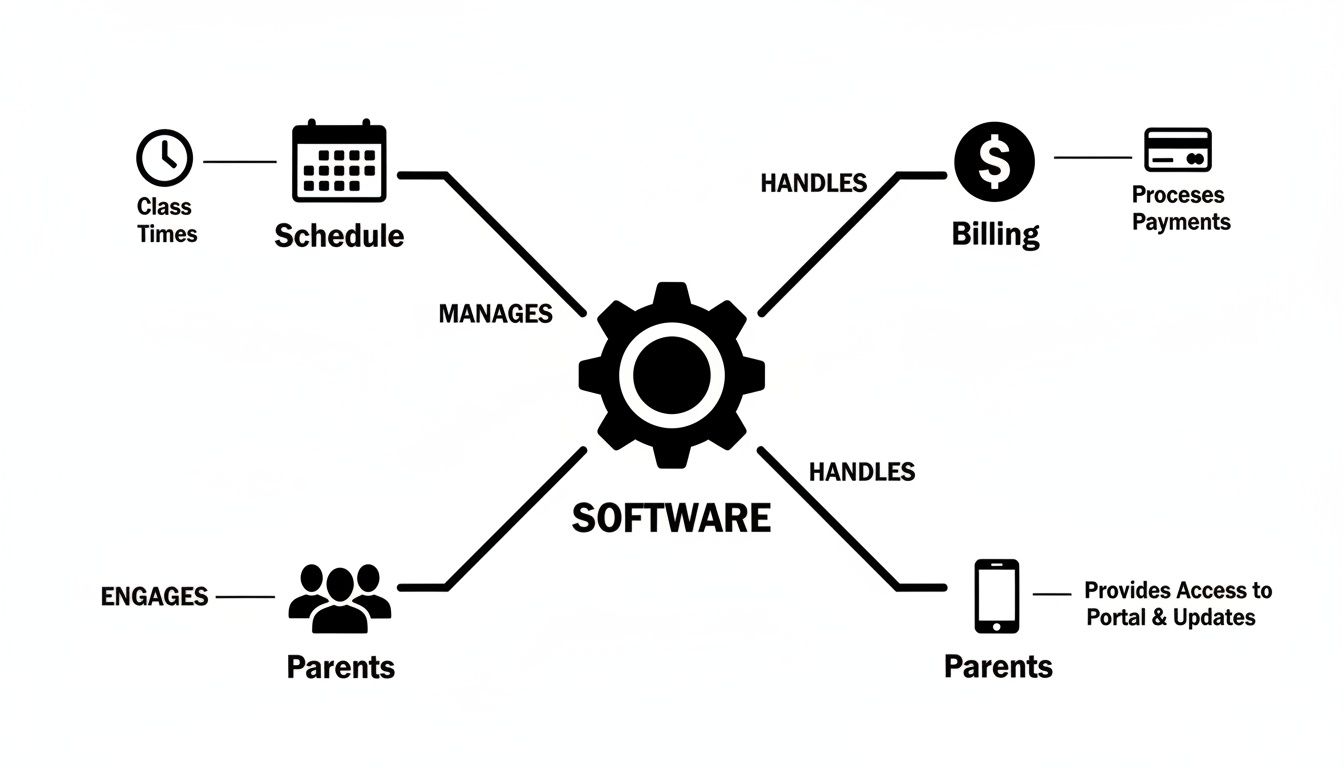
As you can see, the right system connects your core functions. When a parent books a class online, the system generates the invoice automatically, and it instantly updates the teacher's schedule.
How do I handle different program rules in one system?
This is the magic of purpose-built children enrichment center software. Instead of forcing all your activities into one rigid template, it lets you set up unique rules for every single thing you offer. You can easily define custom settings.
These settings include:
- Unique Pricing Structures: Set per-lesson rates, term-based fees, or special package pricing for camps.
- Custom Cancellation Policies: Enforce a 24-hour rule for music lessons while allowing more flexibility for group art classes.
- Specific Instructor Payroll: Assign different pay rates based on the class type or number of students.
This level of control ensures your operations align with your business policies. For more details, our article on recurring lesson scheduling software explains how this works.
How can I prevent double bookings and manage capacity?
Double-booking a teacher or a room is a common and costly administrative mistake. Modern software makes this a thing of the past. Its built-in conflict detection works in real-time, instantly flagging any attempt to schedule a resource that is already taken.
The software also actively manages your class capacity to maximize revenue. You simply set the maximum number of students for each group class. Once that limit is hit, the system automatically closes online registration and lets parents join a digital waitlist.
How do I convert a trial class to full enrollment?
Software streamlines the entire workflow from trial to long-term customer. You can easily tag students as "trial" enrollments, letting you track them separately. Once the trial is over, the system can prompt an administrator to follow up.
With just a few clicks, you can convert that trial into a full-term enrollment. This single action automatically triggers the correct invoice based on the program's predefined billing rules. This seamless transition cuts down on administrative friction and improves your conversion rate.
The Financial Impact of Automating Your Centre
Bringing in children enrichment center software is a financial strategy, not just an expense. The ROI is clear: it can slash administrative overhead by up to 60%, help you get paid faster, and keep your classes full. This frees up cash and time to reinvest in growth.
The most immediate payback comes from eliminating the hours your team wastes on repetitive tasks. Instead of hiring more admin staff as you grow, your current team can pivot to high-value work. This includes engaging with parents, running marketing campaigns, and developing new, profitable programs.
How does automation fix your cash flow?
Slow payments can quietly suffocate a small business. Software attacks this problem by automating the entire billing cycle, from invoice generation to payment collection. When you give parents an online portal, you make it easy for them to pay you on time.
- Automated Nudges: The system sends polite reminders for overdue payments.
- Easy Online Payments: Parents can pay right away with a credit card.
- Less Admin Chasing: This typically frees up 5-10 hours of staff time every week.
How do you squeeze more revenue from existing classes?
Every empty seat in a class is money left on the table. An intelligent scheduling system is designed to maximize your fill rates. It gives you a clear view of enrollment numbers, letting you spot underperforming classes.
Automated waitlist management turns a potential loss into a win. The moment a spot opens up, the system can instantly ping the next parent on the list and fill that seat. By optimizing schedules and using waitlists, centers can increase class fill rates by 15-20% in the first year.
To see how these features translate into real gains, explore the ROI of tutoring management software. For a broader view, check out this practical guide to marketing automation for small businesses.
How to Choose the Right Software Partner
Picking a children enrichment center software is a long-term commitment. You need a partner who offers solid support, transparent pricing, and a platform that can grow with your business. A bit of due diligence now saves you from major headaches later.
The right partner gives you more than just code. They are responsible for reliable support, bulletproof data security, and a platform that keeps up with your ambition. When you are ready to grow, your software must be right there with you, not holding you back.

How do you create a vendor shortlist?
First, focus on providers that specialize in the education sector. Generic business software cannot handle the realities of class scheduling, package billing, and parent communication. A specialist vendor understands your pain points from day one.
Next, look at the provider's regional presence. A partner with a foothold in your area will understand local payment gateways and compliance rules. That local knowledge is priceless when you need timely and relevant support.
How do you run an effective software demo?
A software demo is your chance to test the system. Do not let them give you a generic sales pitch. Show up with a list of your trickiest real-world scenarios and ask them to show you exactly how the software handles them.
For example, ask them to set up a multi-week camp with an early-bird discount and a specific cancellation policy. This is a far better test of the system’s flexibility than a standard feature tour.
The demand for quality childcare is growing. In Hong Kong, subsidized places cover only about 7% of children under three. As new facilities are planned, centers that manage enrollments smoothly will have a huge advantage. Explore more on Hong Kong's early education challenges.
What questions should I ask potential software partners?
Beyond features, you need to understand the partnership.
- What does your onboarding process look like? Ask about data migration, staff training, and average time to get running.
- How is your support team set up? Get specifics on response times, support channels, and whether you get a dedicated contact.
- Can I speak to a few of your current clients? Talking to real users is the best way to get an unfiltered look.
- What is the total cost of ownership? Look past the subscription. Ask about fees for setup, training, or usage limits.
A Smooth Plan for Implementing Your New System
Switching to new software is a structured process, not a chaotic leap. A successful rollout hinges on a clear plan covering data migration, staff training, and parent communication. A phased pilot launch can ensure everything runs smoothly from day one.
The journey starts with clean data migration, followed by comprehensive staff training and clear communication to parents. Many centers run a small pilot test before a full launch. This is a smart way to iron out any kinks in a controlled environment.
Best Practices for Data Migration
Your data is the lifeblood of your center, so migrating it accurately is the first critical step. Start by cleaning your existing data. This means removing duplicate student profiles, standardizing formats, and ensuring all contact information is up to date. This simple housekeeping makes the import process faster and more accurate.
A clean data migration is the foundation of a successful implementation. Taking time to organize your information beforehand can reduce post-launch errors by over 70%. This ensures your reports and billings are accurate from the start.
Empowering Your Staff Through Effective Training
Your team’s confidence in the new system is essential for a smooth rollout. Your software provider should offer a mix of training resources to suit different learning styles.
Look for a provider that offers:
- Live Onboarding Sessions: A guided walkthrough with an implementation specialist.
- Video Tutorials: Short, on-demand videos that cover key workflows.
- A Detailed Knowledge Base: A searchable online library of articles and guides.
Encourage your team to practice in a "sandbox" or demo environment before the system goes live. This lets them explore features and make mistakes without affecting real student data.
Communicating the Change to Parents
Keep parents informed and excited about the upcoming changes. Frame the new system as a major upgrade to their experience. Highlight benefits like easier online booking, convenient payment options, and better communication.
Send a series of communications before, during, and after the launch. This proactive approach manages expectations and showcases your center's commitment to a professional experience. For a system built to support your growth, explore a demo at tutorbase.com/register.
Frequently Asked Questions
What is children enrichment center software?
Children enrichment center software is a specialized platform that helps you manage all aspects of your center. Key features include class scheduling, automated billing, student enrollment, and a parent communication portal. This software automates administrative tasks, saving you time and reducing errors.
How much does children enrichment center software cost?
Pricing is typically a monthly subscription based on the number of active students or locations. Plans for smaller centers can start around $50 to $100 per month. Larger, multi-branch operations needing advanced features might pay between $200 and $1,000+ per month.
Can this software handle different types of classes?
Yes, a key strength of this software is its ability to manage diverse programs. You can set unique rules, pricing, schedules, and capacity limits for every activity you offer, including private lessons, group classes, and holiday camps, all from one central system.
How long does it take to implement new software?
A typical implementation takes between one and four weeks. This timeline depends on the size of your center and the complexity of your data migration. The process includes data import, system setup, and staff training to ensure a smooth transition.
Is my center's data secure on a cloud-based platform?
Yes, reputable providers use industry-standard security measures. They host platforms on secure cloud infrastructure like Amazon Web Services (AWS) and use robust data encryption. Always ask a vendor about their security certifications and data privacy policies to ensure protection.
Does the software integrate with other tools?
Most modern platforms integrate with essential tools. Critical integrations include online payment gateways like Stripe and calendar applications. Some systems also connect with accounting software or marketing tools, so check for specific integrations you need.
How does this software manage multi-activity programs?
The software allows you to define unique rules for each program. You can set different pricing, cancellation policies, and billing cycles for your art classes, sports camps, and academic tutoring. This flexibility ensures the system adapts to your business model, not the other way around.
What kind of support can I expect from a software provider?
A good provider offers comprehensive onboarding and ongoing support. This typically includes a dedicated setup specialist, a library of video tutorials, and access to a support team via email, chat, or phone. This ensures you can get fast answers when you need help.
Ready to stop wrestling with admin and see what automation can do for your center? Tutorbase provides tools to manage scheduling, billing, and parent communication in a fraction of the time. This lets you get back to focusing on growth.


