


Key Takeaway: While Teachworks served as a foundational tool, scaling tutoring centers now require more powerful alternatives. Modern platforms like Tutorbase reduce admin time by over 60% by automating scheduling, billing, and complex payroll, replacing fragmented tools with a single, AI-powered system that prevents costly booking errors and supports multi-branch growth.
Tutoring centers using Teachworks or manual systems often spend over 10 hours a week on administrative tasks. Operations managers juggle Google Calendar for scheduling, QuickBooks for billing, and Excel for payroll. This fragmented approach leads to double-booked teachers, overbooked rooms, and hours spent chasing payments, directly hindering growth and profitability.
The need to modernize is driven by new market dynamics and competition. You can learn more about the evolving landscape of online tutoring platforms and the pressure on traditional centers to improve efficiency.
This guide reviews the top 10 alternatives to Teachworks, plus bonus options, to help you find a system that automates your operations. We analyze each platform's ideal use case, standout features, and pricing to help you reclaim your time and focus on growth.
1. Tutorbase
Tutorbase is an AI-powered tutoring management software designed for centers constrained by legacy systems like Teachworks. It replaces fragmented tools with a single platform that consolidates scheduling, billing, payroll, multi-branch room management, and lead tracking. It is engineered for tutoring centers, language schools, and test-prep academies with 5-100+ teachers managing 50 to 10,000+ lessons per week.
Its standout features are the AI-powered Find Slot and Find Spot tools, which slash booking time from over 10 minutes to under two. Tutorbase automates complex financial workflows. It generates invoices directly from attendance records and natively supports prepaid credits and package auto-consumption. Its payroll engine handles revenue sharing, per-student rates, and overtime, a significant step up from the basic hourly models of competitors. Users report a 60% reduction in admin time and a 42% increase in monthly renewals.
Key Strengths & Use Cases
- AI-Powered Scheduling: The Find Slot feature instantly generates optimal teacher, room, and time combinations, preventing double-bookings. Find Spot fills empty seats in existing classes to maximize group utilization.
- Automated Financial Operations: Tutorbase connects attendance directly to billing and payroll, eliminating manual invoice creation and complex payroll calculations.
- Multi-Branch Management: A unified dashboard provides complete oversight of all locations. Manage room availability, track teacher assignments, and view financial performance across your entire network from one place.
- Flexible Pricing Policies: "Policy Packs" allow you to set layered pricing rules and automated cancellation policies, ensuring consistent and accurate billing.
Pricing and Onboarding
Tutorbase pricing is tailored to the size and needs of your business, based on factors like lesson volume and number of branches. You must contact their sales team for a customized quote. Given its focus on scale, the platform requires a dedicated onboarding and migration process, which is more involved than what a solo tutor might need.
- Pros: Consolidates all core operations, reducing admin time by 60%. Advanced AI scheduling prevents booking errors. Robust billing, native prepaid credits, and complex payroll automation are built-in.
- Cons: Pricing is not publicly listed and requires a sales consultation. The comprehensive feature set may be overkill for very small, single-tutor operations.
Website: https://tutorbase.com
2. G2
G2 is a B2B software marketplace where you can discover and compare dozens of Teachworks alternatives, not a direct software itself. It aggregates verified user reviews and feature lists, making it an essential first stop for any tutoring center owner vetting new management tools. Its value is consolidating user sentiment and competitive data into one searchable database.
The platform allows you to compare multiple vendors side-by-side, filtering by features crucial to tutoring centers like classroom management, virtual classrooms, and billing automation. This helps you quickly shortlist tools that fit your operational needs. For tutoring businesses, focus on recent reviews from companies of a similar size to your own.
What should you look for on G2?
- Side-by-side comparisons: View features from multiple vendors in a structured grid.
- Verified user reviews: Filter by company size and role to find relevant feedback.
- Category filtering: Narrow your search to "Tutoring" or "Classroom Management" software.
- Screenshots and videos: Get a feel for the user interface before booking a demo.
Pros & Cons
- Pro: The high volume of recent, verified reviews provides a strong signal of a product's current user satisfaction.
- Pro: The “Compare” feature streamlines the vetting process, saving hours of manual research.
- Con: Sponsored placements can influence the default ordering of software, so always apply your own filters.
- Con: Accessing some in-depth comparison reports requires creating a free account.
Website: https://www.g2.com/products/teachworks/competitors/alternatives
3. Capterra
Capterra is another comprehensive software review marketplace, similar to G2. Its strength lies in presenting a broad directory of business software with a detailed profile for Teachworks and a prominent ‘alternatives’ section. This makes it a valuable resource for tutoring center owners looking to quickly compare features and pricing across multiple platforms.
The platform provides tangible pricing snapshots, often displaying clear pricing cards for different vendor tiers side-by-side. For tutoring businesses, the most effective way to use Capterra is to leverage its user reviews, which are often from education-focused businesses, and to use the feature matrices to validate if a tool meets specific needs like multi-location management or automated payroll.
What should you look for on Capterra?
- Detailed Teachworks profile: A dedicated page with a clear link to direct alternatives.
- Tangible pricing cards: View subscription tiers and costs for multiple vendors.
- User reviews from education businesses: Filter feedback from similar tutoring centers or schools.
- Integrations and feature matrices: Quickly check for compatibility with tools like QuickBooks.
Pros & Cons
- Pro: The snapshot of pricing tiers across multiple vendors simplifies budget planning.
- Pro: It lists a broad range of alternatives suitable for small businesses and larger enterprises.
- Con: Sponsored profiles often appear higher in search results, so filtering is essential.
- Con: Some listings skew toward general school management software, not tutoring-specific tools.
Website: https://www.capterra.com/p/233485/Teachworks/
4. GetApp
GetApp is a software discovery platform that helps tutoring business owners find and compare management tools. It maintains a dedicated catalog of Teachworks alternatives, focusing on direct feature comparisons and providing at-a-glance information like starting prices and verified review counts. Its layout is designed to help you quickly identify potential fits for your tutoring, music, or after-school programs.
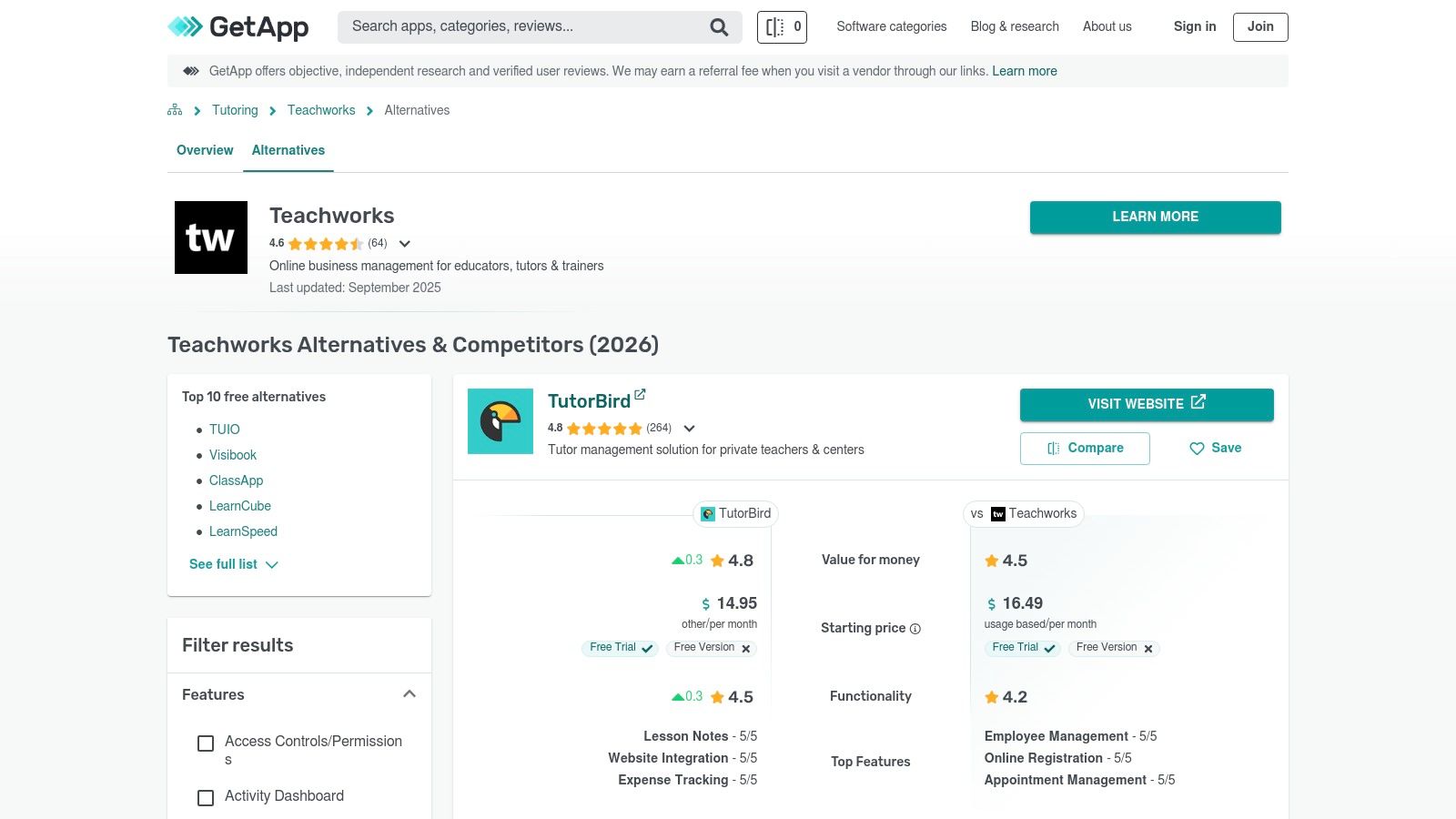
The platform’s value lies in its clear, action-oriented interface. Each listing provides a summary, key features, and a direct “visit website” link to start a trial or book a demo, streamlining the process from research to action. GetApp is an excellent resource for creating a shortlist based on pricing, core functionality, and user sentiment from businesses in similar education verticals.
What should you look for on GetApp?
- Curated alternatives lists: View a specific catalog of software positioned as Teachworks competitors.
- Pricing starting points: Many listings include the starting price, helping you filter by budget early on.
- Verified review counts: Quickly gauge a product's popularity and user base size.
- Direct vendor links: Easily navigate to vendor sites to start free trials.
Pros & Cons
- Pro: The platform has good coverage across tutoring, music schools, and other after-school program verticals.
- Pro: Clear “visit website” calls to action make it easy to move from research to trial.
- Con: The search results can sometimes include non-tutoring tools, creating category noise.
- Con: Pricing data is not always current and can lag behind updates on the vendor's own website.
Website: https://www.getapp.com/education-childcare-software/a/teachworks/alternatives/
5. SourceForge
SourceForge is a business software directory where you can explore ranked lists of Teachworks competitors. It aggregates product information, pricing notes, and user reviews to help you validate your choices. Its main function is to serve as an additional data point in your research, allowing you to cross-reference findings and occasionally surface niche tools you might have missed elsewhere.
For tutoring businesses, SourceForge offers a simple, scannable interface to quickly gather initial impressions. The value here lies in using it as a secondary source. After identifying a potential alternative on a more specialized site, you can check its SourceForge profile for another perspective. This helps confirm that your top choices are consistently well-regarded across the market.
What should you look for on SourceForge?
- Ranked alternatives list: See how different products are positioned against each other.
- Feature blurbs: Get quick, high-level summaries of each software's capabilities.
- Pricing notes: Find available pricing information without navigating to the vendor's site.
- Vendor-agnostic links: Easily click through to official product pages for demos.
Pros & Cons
- Pro: Provides another viewpoint for validation, strengthening your research process.
- Pro: Occasionally surfaces niche or newer tools that may not be featured on larger platforms.
- Con: Its education-specific category depth is lighter than more specialized marketplaces.
- Con: The volume and recency of user reviews can vary widely between different products.
Website: https://sourceforge.net/software/product/Teachworks/alternatives
6. TutorCruncher
TutorCruncher is a comprehensive tutoring management platform designed to scale with agencies, from solo tutors to large enterprise operations. It integrates a CRM, scheduling, billing, and payroll into a single system, making it a strong Teachworks alternative for businesses focused on growth. Its primary strength lies in its financial tools, which handle complex invoicing and payroll scenarios.
The platform excels at managing the financial relationship between clients, tutors, and the agency. It supports everything from hourly billing to complex split payments, subscriptions, and automated payroll calculations. For a growing agency, this means less time spent manually calculating payouts and chasing invoices. You can explore more about its capabilities in this tuition management systems review.
Key Features & What to Look For:
- Invoicing and payroll automation: Generates invoices from completed lessons and automates tutor payouts.
- Client pipeline and scheduling tools: Manages leads from intake to conversion and schedules lessons.
- Subscriptions and split payments: Offers flexible payment models for clients.
- API and custom integrations: Allows for custom workflows on higher tiers.
Pros & Cons
- Pro: The platform scales effectively, supporting businesses from startup to enterprise.
- Pro: Rich payment and payout controls are ideal for agencies that manage finances for multiple contractors.
- Con: The combination of subscription, payment processing, and usage fees can be complex to forecast.
- Con: The user interface has significant depth, which may require a dedicated onboarding period to master.
Website: https://tutorcruncher.com/pricing/us/
7. LearnSpeed
LearnSpeed is a tutoring management platform known for its unique usage-based pricing model. Instead of a monthly subscription per user, LearnSpeed charges per recorded session, making it an intriguing option for businesses with fluctuating seasonal demand. It offers core functionalities like scheduling, billing, and extensive reporting, plus an integrated online classroom called "Vision".
This platform's primary appeal is its predictable cost structure, particularly during slower periods. For tutoring businesses that experience significant dips in activity, such as during summer holidays, the per-session model avoids paying for idle software. The interface prioritizes function over modern aesthetics. As one of the more established Teachworks alternatives, it has a proven track record.

Key Features & What to Look For:
- Usage-based pricing: A per-recorded-session model with no user limits.
- Integrated online classroom: "Vision" allows for virtual tutoring directly within the platform.
- Extensive reporting: Access over 100 different reports for deep business insights.
- Lead tracking: Built-in tools to manage prospective student inquiries.
Pros & Cons
- Pro: The per-session billing model makes costs highly predictable and affordable during slow months.
- Pro: Offers no long-term contracts and includes lifetime email support for all customers.
- Con: High-volume tutoring centers may find the per-session costs more expensive than a flat-rate plan.
- Con: The user interface is functional but feels dated compared to more modern platforms.
Website: https://www.learnspeed.com/pricing/
8. Oases Online
Oases Online is a comprehensive tutoring management software built to support the operational demands of growing and multi-location tutoring centers. It offers a complete suite of tools for scheduling, billing, student tracking, and payroll. Its core value lies in a scalable pricing model that grows with your business, tying costs directly to the number of active students you manage each month.
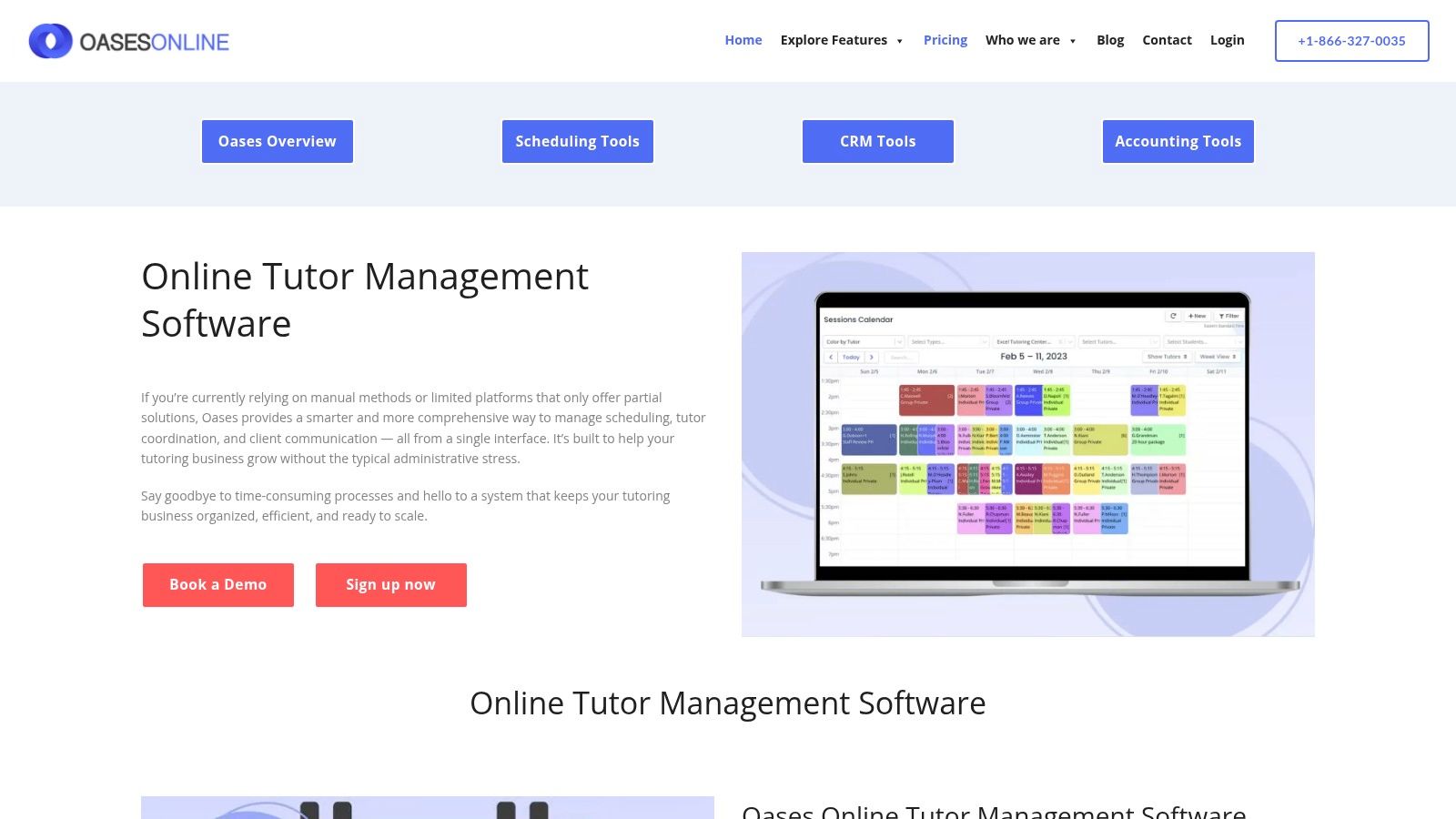
This platform is particularly well-suited for tutoring businesses planning for expansion or those already managing multiple branches. The system is designed to handle complex scheduling and billing across different locations from a single dashboard. For tutoring center owners looking for a Teachworks alternative that can handle increased operational complexity, Oases Online provides a dedicated and robust solution.
Key Features & What to Look For:
- Auto-tiering pricing: Monthly fees adjust based on active student counts, with prorated billing.
- End-to-end workflows: Manages the entire process from initial session booking to payroll and reporting.
- Multi-location support: Built from the ground up to support multi-branch operations.
- Student and parent portals: Provides secure access for families to view schedules and billing.
Pros & Cons
- Pro: The clear, student-based pricing model provides predictable costs as your center scales.
- Pro: Its focus on tutoring-specific workflows avoids the clutter of generic management tools.
- Con: Monthly costs can become higher at larger student tiers compared to some competitors.
- Con: The platform has fewer publicly listed third-party integrations than larger vendors.
Website: https://oasesonline.com/tutor-management-software/
9. Teach ’n Go
Teach ’n Go is an all-in-one school and tutoring management platform designed to centralize core administrative tasks. It offers a comprehensive suite of tools for scheduling, attendance tracking, billing, and teacher payroll, making it a strong contender for centers looking to consolidate operations. The platform emphasizes transparent pricing, providing a mobile app for on-the-go management.
A key differentiator for Teach 'n Go is its straightforward approach to onboarding, offering optional, paid migration and training services. This allows new users to get up and running quickly. For businesses evaluating Teachworks alternatives, Teach 'n Go provides a well-rounded feature set with payment integrations like Stripe and PayPal, simplifying tuition collection.
Key Features & What to Look For:
- Transparent pricing tiers: Plans often include unlimited teachers and classes.
- Integrated payments: Supports Stripe and PayPal for automated invoicing and billing.
- Mobile app access: Provides teachers and admins with scheduling and communication tools on their phones.
- Optional professional services: Access paid onboarding and data migration for a smoother transition.
Pros & Cons
- Pro: The system is user-friendly and includes mobile access, which is great for remote teams.
- Pro: Optional, paid services for training and migration are transparently priced, allowing businesses to budget for setup costs.
- Con: As a Euro-based company, pricing may fluctuate for USD-based businesses.
- Con: Businesses requiring highly advanced customizations might need to purchase additional paid services.
Website: https://www.teachngo.com/pages/pricing
10. Jumbula
Jumbula is a U.S.-based registration and program management platform for after-school providers, camps, and enrichment programs. It stands out as a Teachworks alternative for centers that operate a hybrid model, blending ongoing tutoring with seasonal camps or workshops. Its strength lies in its family-facing checkout flows and tools for managing varied program types.
The platform is designed around managing registrations for distinct programs rather than just individual lessons. For a tutoring business, this is ideal for summer test-prep bootcamps or after-school clubs. Jumbula’s pricing model is also transparent, offering multiple plans plus a clear cost calculator to estimate monthly expenses based on add-ons, which helps businesses predict their software spend.
Key Features & What to Look For:
- Program registration: Handles complex sign-ups for classes, camps, and events.
- Parent portal: Allows families to manage multiple children and registrations from one account.
- Flexible pricing: Set up early bird discounts, sibling discounts, and installment plans.
- Add-on services: Optional features like dedicated apps, email marketing, and SMS.
Pros & Cons
- Pro: The platform excels at managing both seasonal and ongoing programs, offering great flexibility.
- Pro: Transparent pricing with a cost calculator and nonprofit discounts provides financial clarity.
- Con: The cost can increase significantly as you add necessary features like SMS and extra app seats.
- Con: Standard credit card processing fees apply to all transactions made through the platform.
Website: https://jumbula.com/pricing/
11. Sawyer for Business (Hisawyer)
Sawyer for Business is a scheduling, registration, and payment platform built for children’s activity providers. While not a dedicated tutoring system, it serves as a viable Teachworks alternative for centers that primarily sell group classes and seasonal camps. Its main draw is the built-in national marketplace, which can expose your programs to parents actively seeking activities.
The platform is designed to get your programs online and selling quickly, with a clean interface for parents to browse, book, and pay. For tutoring businesses, its strength lies in marketing and registration for group-based offerings like SAT prep courses. The fee structure, which often includes booking fees or a percentage take rate, is a critical consideration for managing profit margins.
Key Features & What to Look For:
- National Marketplace: Gain visibility and attract new students by listing your classes and camps.
- Multiple Plans: Choose from different fee structures (Launch, Grow, Scale) to match your business model.
- Flexible Payment Options: Accept various payment methods, including ACH, to reduce processing fees.
- Streamlined Registration: Provides a user-friendly booking experience for parents.
Pros & Cons
- Pro: The marketplace feature can be a powerful channel for customer acquisition and enrollment growth.
- Pro: The system is designed for fast setup, allowing you to launch program registration quickly.
- Con: Booking fees and marketplace take rates can significantly impact your overall revenue.
- Con: Lacks tutoring-specific features like complex payroll logic and per-student progress tracking.
Website: https://www.hisawyer.com/for-business/pricing
12. TutorBird
TutorBird is a lightweight and affordable management tool designed for solo tutors and small teams. Its appeal lies in its simplicity and low-cost entry point, offering core features like scheduling, automated invoicing, and a student portal. This makes it an ideal Teachworks alternative for educators transitioning from spreadsheets who need essential automation without a steep learning curve.
The platform provides a flat base price that covers a single user, with a predictable per-seat fee for adding more staff. For individual tutors or very small centers, TutorBird effectively consolidates administrative tasks, providing tools to create a simple website, manage student records, and send automated lesson reminders. Its focus on the essentials makes it a practical first step into management software.
Key Features & What to Look For:
- Student Portal: Gives students and parents access to their schedules, attendance history, and invoices.
- Simple Website Builder: Create a basic, professional-looking website to attract new clients.
- Payment Integration: Connects with Stripe and PayPal for straightforward online payments.
- Automated Reminders: Reduces no-shows with automated email and SMS reminders.
Pros & Cons
- Pro: The very low monthly cost makes it highly accessible for individual tutors starting out.
- Pro: Its user-friendly interface is a good fit for small teams that do not require extensive training.
- Con: It has limited scalability and lacks the advanced reporting needed by larger centers.
- Con: The platform offers fewer controls for managing multiple branches compared to agency-grade tools.
Website: https://www.tutorbird.com/pricing/
How to Choose the Right Teachworks Alternative for Your Center
Choosing the right tutoring management software is crucial for scaling your business. The best platform depends directly on your operational pain points and growth ambitions. A solo tutor has vastly different needs than a multi-branch language school managing complex payroll calculations.
The goal is to implement true automation that eliminates administrative bottlenecks. Instead of just replacing spreadsheets with a digital calendar, look for a system that intelligently manages your resources, prevents booking errors, and connects every operational dot from lead intake to final payroll settlement.
A Practical Framework for Your Decision
When evaluating your options, use a structured approach:
- Core Bottlenecks: Identify your top three time-consuming administrative tasks. Is it manual invoicing, chasing payments, or finding available slots? Prioritize software that automates solutions for these specific problems.
- Scalability: Will this software support you when you double your student base or open a new location? Assess its capabilities for multi-branch management and handling a high volume of lessons without performance degradation.
- Payroll and Billing Complexity: Your financial operations are the lifeblood of your center. Does the software support your specific pricing models (per-hour, packages, subscriptions) and teacher compensation structures (revenue share, premiums)? True automation means invoices generate from attendance data without manual entry.
- Integration vs. All-in-One: A fragmented toolkit creates data silos. An all-in-one platform like Tutorbase consolidates CRM, scheduling, and billing, providing a single source of truth and seamless workflows. This unified approach is essential for gaining clear visibility into your business.
Choosing from the top alternatives to Teachworks is a strategic decision that will directly impact your center's efficiency. Avoid solutions that offer surface-level features. Instead, invest in a platform built to solve the deep-rooted operational challenges unique to growing tutoring businesses.
Ready to eliminate administrative chaos and see how an AI-powered, all-in-one platform can transform your operations? Tutorbase was built by tutoring center owners to solve the exact challenges you face, from automated scheduling to complex payroll. Start your free trial today and experience the future of tutoring management.
Frequently Asked Questions (FAQ)
What is the best alternative to Teachworks for a multi-location tutoring center?
For multi-location centers, Tutorbase is the strongest alternative. Its platform is specifically designed for managing multiple branches from a single dashboard, including shared teacher resources, location-specific pricing, and comprehensive room management. This centralized control prevents booking conflicts and provides clear visibility across the entire business, which is a common limitation in other systems.
Which Teachworks alternative has the best automated billing and invoicing?
Tutorbase offers the most robust automated billing. It connects lesson attendance directly to invoicing, so invoices are generated automatically without manual data entry. It natively handles complex scenarios like prepaid credit packages, auto-deductions, low-balance alerts, and varied billing cadences (per-lesson, weekly, monthly), which significantly reduces administrative time compared to the semi-manual processes in tools like TutorCruncher.
Are there any free alternatives to Teachworks?
While most comprehensive tutoring management software requires a subscription, some platforms offer a very limited free tier or extended free trials. However, "free" often comes with significant limitations on the number of students, teachers, or features. For a growing center, relying on free tools or spreadsheets is not a scalable solution and typically costs more in lost time and errors than a paid subscription.
How does Tutorbase's "Find Slot" feature compare to manual scheduling?
Tutorbase's AI-powered "Find Slot" feature reduces the time it takes to book a new student from over 10 minutes to under two minutes. Instead of manually checking multiple teacher calendars, room availability, and student schedules, an administrator simply enters the student's requirements (subject, level, time preference). The system instantly generates all possible, conflict-free combinations of available teachers, rooms, and times, eliminating double-bookings and administrative guesswork.
Can these alternatives handle complex teacher payroll?
Yes, but with varying capabilities. Basic systems like TutorBird handle simple hourly rates well. However, for complex payroll involving revenue sharing, per-student rates, weekend premiums, or bonus structures, Tutorbase is superior. Its dedicated payroll engine automates these calculations based on predefined contract rules, a feature that basic hourly systems in Teachworks and TutorCruncher lack.
What is the primary problem that Tutorbase solves for tutoring centers?
Tutorbase solves the problem of operational fragmentation and manual workload. Tutoring centers lose money and time juggling separate tools for scheduling (Google Calendar), billing (QuickBooks), and payroll (Excel). This leads to booking errors, administrative burden (10+ hours/week), and a lack of visibility into business performance. Tutorbase consolidates these functions into one AI-powered platform, automating processes to reduce admin time by over 60%.


